TL;DR: Claude Code is where security engineers already work. ARTEMIS Recon is a free MCP plugin that turns it into an AI red teaming workflow — install the plugin, point it at any AI agent, get a structured attack-surface map in minutes. This guide walks through the full workflow: setup, automated reconnaissance, and escalation to full red teaming. Install ARTEMIS Recon free →
Why Claude Code is the right environment for AI red teaming#
Security engineers already live in Claude Code. They use it to read codebases, debug systems, write tests, and ship fixes. When they need to assess an AI application's security, opening a separate tool in a separate environment with a separate workflow creates friction that means the assessment doesn't happen — or happens once and never again.
The better approach: bring the red teaming capability into the environment you already use. Claude Code supports MCP (Model Context Protocol) servers — plugins that extend what the agent can do. An MCP server can give Claude Code new tools: web browsing, API interaction, structured analysis. ARTEMIS Recon is an MCP server built specifically for AI attack surface reconnaissance. Install it once, and every Claude Code session has access to structured AI red teaming.
We wrote previously about what raw Claude Code cannot do for red teaming — it lacks a persistent attack library, a verifier loop, and the freedom to generate working payloads. Those limits are real and they still apply. What this guide covers is how to use Claude Code with the right plugin to do the part it can do well: structured reconnaissance and attack surface mapping that feeds into a full AI penetration testing methodology.
The workflow#
The workflow has three phases. Each one builds on the last.
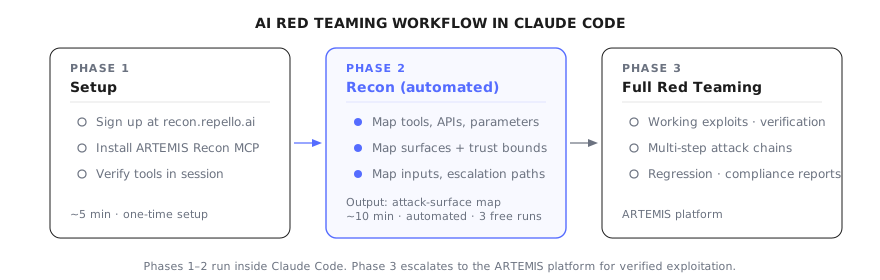
Three phases. Phase 2 (Recon) is automated by ARTEMIS Recon — the plugin maps the attack surface. Phase 3 escalates to full red teaming via the ARTEMIS platform.
Phase 1: Setup#
Install ARTEMIS Recon as an MCP server in your Claude Code environment.
Step 1 — Sign up. Go to recon.repello.ai and sign up with your work email. You get three free runs.
Step 2 — Install the MCP server. Follow the setup instructions to add ARTEMIS Recon as an MCP server in your Claude Code configuration. This typically involves adding the server to your .claude/mcp.json or global MCP config.
Step 3 — Verify the connection. Open a Claude Code session and confirm the ARTEMIS Recon tools are available. You should see the recon tools listed when you ask Claude Code what tools it has access to.
The setup takes under five minutes. Once installed, ARTEMIS Recon is available in every Claude Code session — you don't need to reinstall per project.
Phase 2: Automated reconnaissance#
This is where ARTEMIS Recon does the heavy lifting. Point it at your target and let it map the attack surface.
What it maps:
- Tools and APIs — every tool the AI agent can call, its parameters, permissions, and side effects. For MCP-based agents, this includes every MCP server and every tool it exposes.
- Prompt surface — system prompt structure, instruction hierarchy, conversation context handling.
- Input modalities — text, files, images, structured data, voice — every channel through which content enters the agent's context.
- Trust boundaries — where untrusted input crosses into trusted context, where low-privilege data reaches high-privilege tools.
- Escalation paths — tool chains that combine to create capabilities beyond any individual tool's intended scope.
The output is a structured attack-surface map — not a vague "this might be vulnerable" but a specific topology of what an attacker can reach, through which paths, with what blast radius.
Why this matters: the hardest part of AI security testing is knowing what to test. Traditional web applications have well-defined endpoints. AI applications have implicit tool access, hidden retrieval sources, and emergent behaviors that change with every prompt. Without the map, you are testing blindly. With it, every subsequent test is targeted.
Phase 3: Escalate to full red teaming#
Reconnaissance maps the attack surface — where the vulnerabilities live, which trust boundaries are crossable, which tool chains are exploitable. To go from that map to working exploits, multi-step attack chains, automated verification, and continuous regression testing — escalate to the ARTEMIS platform.
When to escalate:
- You found trust boundary violations and need to prove exploitability with working payloads
- The target has a complex tool surface that requires automated red teaming for full coverage
- You need a continuous regression layer that re-tests after every deployment
- You need a report for compliance or stakeholder communication
How findings transfer:
The attack-surface map from Phase 2 feeds directly into the ARTEMIS platform. The reconnaissance is not repeated — the platform picks up where Recon left off, using the map to plan and execute targeted exploitation.
What raw Claude Code misses (and why the plugin matters)#
We covered this in detail in our post on Claude Code's red teaming limits, but here is the practical summary for this workflow:
Without the plugin:
- No structured methodology — you are asking Claude Code to improvise
- No systematic tool enumeration — you find what you think to ask about
- No trust boundary analysis — the most critical findings are the ones you never tested
- No coverage tracking — you don't know what you haven't tested
- Single-pass, single-session — everything is forgotten between sessions
With the plugin:
- Structured reconnaissance follows a methodology derived from OWASP LLM Top 10 and OWASP Agentic AI Top 10
- Systematic enumeration maps every tool, parameter, and trust boundary
- The map persists as an artifact you can revisit, share, and use as a testing baseline
- Coverage is visible — you can see exactly what the reconnaissance covered and what remains untested
The plugin does not solve every limit. Claude Code still cannot generate working exploits (the safety-classifier ceiling), still has no persistent attack memory across targets, and still grades its own work without an independent verifier. For those, you need the full ARTEMIS platform. But reconnaissance — knowing exactly what to test and where the highest-risk paths are — the plugin handles well.
Comparison: raw Claude Code vs. Claude Code + Recon vs. full ARTEMIS#
| Capability | Raw Claude Code | Claude Code + Recon | ARTEMIS Platform |
|---|---|---|---|
| Attack surface mapping | Ad-hoc, incomplete | Structured, systematic | Structured, systematic |
| Tool enumeration | What you ask about | Every tool, parameter, permission | Every tool + exploitation |
| Trust boundary analysis | Manual, if you think of it | Automated, complete | Automated + exploited |
| Prompt injection testing | One-shot probes | Guided by the map | Adaptive multi-turn campaigns |
| Working exploits | Refused by safety classifiers | Manual crafting (you do the work) | Automated, verified |
| Persistent attack memory | None | Map persists per target | Cross-target library |
| Verification | Self-graded | Manual verification | Independent verifier loop |
| Coverage | Whatever you tested | Visible via the map | Full OWASP/ATLAS coverage |
| Cost | Your Claude Code subscription | Free (3 runs) | Commercial |
Frequently asked questions#
Can I use Claude Code to red team AI applications?
Yes — but not by pointing raw Claude Code at a target and asking it to "find vulnerabilities." Claude Code is an orchestrator, not a red teaming harness. To turn it into one, you need a purpose-built plugin like ARTEMIS Recon that adds attack surface mapping, structured reconnaissance, and adversarial testing methodology. The plugin runs inside your Claude Code session, so you stay in the environment you already work in while getting the harness you need.
What is ARTEMIS Recon and how does it work with Claude Code?
ARTEMIS Recon is a free MCP plugin for Claude Code that automates AI attack surface reconnaissance. You install it as an MCP server, point it at any AI agent (web interface or API), and it runs an autonomous reconnaissance engagement — mapping tools, APIs, prompt surface, trust boundaries, input modalities, and escalation paths. The output is a structured attack-surface map that tells you exactly what to test and where the highest-risk paths are.
Is Claude Code AI red teaming free?
ARTEMIS Recon is free for three runs with a work email signup. It runs inside your own Claude Code session, so your data stays local. The free tier covers reconnaissance and attack-surface mapping. Full exploitation and end-to-end autonomous red teaming are available through the ARTEMIS platform.
What is the difference between using raw Claude Code and Claude Code with ARTEMIS Recon?
Raw Claude Code gives you a single-pass conversational probe — you ask it to test something, it tries, and then forgets. ARTEMIS Recon adds structured methodology: systematic tool enumeration, trust boundary analysis, multi-surface coverage, and a structured output format that feeds directly into penetration testing. Raw Claude Code is useful for ad-hoc exploration. Claude Code with ARTEMIS Recon is a repeatable security assessment workflow.
What AI agents can I red team with Claude Code?
Any AI agent with a web interface or API endpoint. This includes customer-facing chatbots, internal AI assistants, AI-powered developer tools, agentic systems with MCP integrations, RAG-enabled applications, and multi-agent workflows. ARTEMIS Recon interacts with the target through its actual interfaces — the same way a real attacker would.
Get started#
The fastest way to see the difference between ad-hoc probing and structured reconnaissance is to try both against the same target.
Install ARTEMIS Recon free → Three runs, work email signup. Runs inside your own Claude Code session. Point it at your AI agent and see what an attacker sees first.