TL;DR: Claude Cowork is not a chatbot — it's a local agent with code execution, file access, browser automation, and scheduled task capabilities running on employee machines. Anthropic's native compliance tooling (Audit Logs, Compliance API, Data Exports) does not cover Cowork activity on any plan tier. Enterprise is the only tier with adequate controls, and even there, organizations need MDM-enforced managed settings, OpenTelemetry routing to a SIEM, MCP server allowlists, and runtime monitoring to close the gaps.
What Claude Cowork actually is#
Most security teams evaluate Claude Cowork as if it were a chatbot with extra features. It is not. Cowork is a full workstation agent that runs inside a local VM on each employee's machine and can:
- Execute arbitrary code in a sandboxed environment (but can request sandbox escape for specific tasks).
- Read and write local files within configured mount points.
- Browse the web using the user's authenticated session cookies — not its own isolated session.
- Execute scheduled tasks unattended, including via Anthropic's "Dispatch" feature where tasks continue running even when the user walks away.
- Connect to enterprise systems via MCP servers (databases, APIs, internal tools) and native connectors (Slack, Google Workspace, Microsoft 365).
- Control the desktop via Computer Use on Pro/Max tiers — full mouse and keyboard automation outside the sandbox.
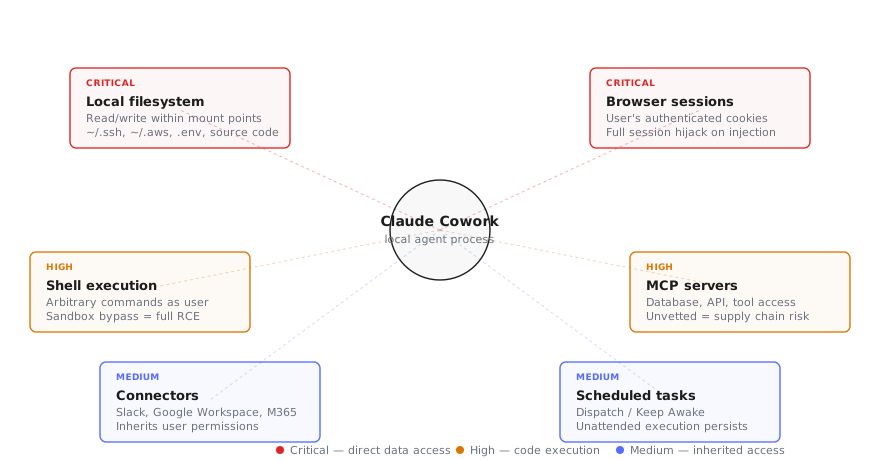
This is a meaningfully different threat surface than Claude.ai or the API. A successful prompt injection against the chatbot leaks conversation context. A successful injection against Cowork can exfiltrate local files, execute shell commands, send messages as the user, and persist via scheduled tasks.
Check Point Research demonstrated this concretely: CVE-2025-59536 (CVSS 8.7) achieved remote code execution by planting malicious hooks in a project's .claude/settings.json — code ran before trust dialogs appeared. CVE-2026-21852 (CVSS 5.3) exfiltrated API keys by overriding ANTHROPIC_BASE_URL to redirect traffic to an attacker-controlled endpoint. Both required nothing more than a developer cloning a repository.
The audit gap: Cowork is invisible to compliance tooling#
This is the single most important fact for security teams evaluating Claude Cowork: Cowork activity is explicitly excluded from all three of Anthropic's compliance mechanisms — Audit Logs, Compliance API, and Data Exports. This applies across every plan tier, including Enterprise.
What this means in practice:
- You cannot pull a compliance report showing what files a user's Cowork session accessed.
- You cannot set DLP alerts on data flowing through Cowork conversations via Anthropic's native tools.
- You cannot demonstrate to auditors exactly what Claude did on a specific machine at a specific time using Anthropic's infrastructure alone.
The only native observability channel is OpenTelemetry export. The admin guide documents configuring an OTEL endpoint that streams session telemetry to your SIEM. But by default, prompts, MCP server names, tool names, and skill names are excluded from those logs — you must explicitly enable verbose logging, and even then the coverage is event-level metadata, not full conversation replay.
Conversation history is stored locally on the user's machine. Your endpoint security posture — full-disk encryption, EDR, patch management — becomes the data-at-rest protection layer for Cowork sessions. If your fleet doesn't enforce FileVault (macOS) or BitLocker (Windows), Cowork conversation data sits unencrypted on disk.
Identity and access hardening#
The plan tier you choose determines what controls are even available:
| Control | Enterprise | Team | Pro/Max |
|---|---|---|---|
| SSO enforcement | Yes | No | No |
| SCIM provisioning | Yes | No | No |
| Custom RBAC roles | Yes (6 capabilities) | No | No |
| Chrome off by default | Yes | No (on by default) | No |
| Tenant restrictions | Yes | No | No |
| Group-based policies | Yes | No | No |
| Connector controls | Org-wide toggles | Limited | None |
Enterprise is the only tier that provides a reasonable security starting point. Team gives basic admin controls but ships with permissive defaults that require immediate attention. Pro and Max tiers have essentially zero organizational security controls — if employees use personal Claude subscriptions for work, you have no governance surface at all.
For Enterprise deployments:
- Enforce SSO and SCIM. Every Cowork user authenticates through your IdP. Deprovisioning flows through SCIM so terminated employees lose access without manual intervention.
- Deploy tenant restrictions. Inject the
anthropic-allowed-org-idsHTTP header at the network layer to prevent users from authenticating to personal Claude accounts on managed devices. - Configure RBAC custom roles. RBAC controls six capabilities — but notably does not cover Chrome, plugins, MCP servers, or connectors. Treat RBAC as one layer, not the whole solution.
- Set group-based spend limits. Most-restrictive precedence applies — assign low-risk groups first, elevate specific teams based on demonstrated need.
MCP servers, plugins, and connectors: the supply chain surface#
Cowork's power comes from its integrations. Every MCP server, plugin, and connector is also an attack surface — each one grants Claude access to systems the user can reach and introduces third-party code into the execution path.
The CIS MCP Companion Guide (April 2026) provides the governance framework: explicit per-tool capability grants, auditable invocations, and least-privilege authorization. In practice, this means:
MCP servers:
- Deploy a managed allowlist via
managed-settings.jsonpushed through MDM. The server-managed settings are non-overridable — users cannot add unauthorized MCP servers on managed devices. - Audit every MCP server before adding it to the allowlist. Check for tool poisoning vulnerabilities — hidden directives in tool descriptions that execute silently.
- Version-pin approved servers. A rogue update to an MCP server you already approved is a supply chain vector identical to a compromised skill in a marketplace.
Plugins:
- Use the plugin marketplace pre-approval workflow. No plugin should reach production endpoints without a code review from your security team.
- Block third-party plugins entirely on high-security groups until you have a vetting process.
Connectors (Slack, Google Workspace, M365):
- Connectors inherit the user's permissions in the connected service. If a developer has admin access to a Slack workspace, Claude inherits that access via the connector.
- Prefer read-only connector configurations where possible. A connector that can send messages as the user is an exfiltration path if Claude is compromised via injection.
- Review connector scopes quarterly. OAuth tokens granted to connectors may persist beyond their intended use.
Repello's MCP Gateway enforces per-tool authorization policies at the protocol layer, blocking connections to unattested servers and logging every invocation — filling the gap that Cowork's native controls leave open.
Network egress and data exfiltration controls#
Claude Cowork's web search and browsing capabilities bypass traditional DLP controls. The agent makes HTTP requests using the user's session cookies — it looks like normal browser traffic to your proxy, but the entity driving those requests is an AI agent that may be following injected instructions.
Hardening the network layer:
- Configure egress allowlists in the admin console. Start restrictive: allow only the domains Cowork needs for core functionality (
api.anthropic.com, OTEL endpoints, approved connector domains). Expand per team based on use case. - Restrict or disable web search. The web search feature is the primary prompt injection vector — Claude fetches arbitrary web pages and processes their content. Every page is an injection opportunity. If your deployment doesn't require web search, disable it.
- Route Cowork traffic through your existing proxy. This gives your CASB/DLP visibility into what domains Claude is reaching, even if it can't inspect the agent's decision-making.
- Set mount controls. Filesystem isolation limits which directories Cowork can access. Configure mount points to exclude sensitive directories (
~/.ssh,~/.aws, credential stores) from Cowork's reach.
The "Dispatch" feature adds another dimension: scheduled tasks can run while the user is away from their machine. A prompt injection that triggers a scheduled exfiltration task can persist across sessions. Monitor scheduled task creation as a high-priority security signal.
Monitoring and incident detection#
Given the audit gap, organizations must build their own detection layer. The Gravitee State of AI Agent Security 2026 report found that only 47.1% of deployed agents are actively monitored — and that was across all agent types. Claude Cowork's audit exclusion makes this gap even more critical.
What to monitor via OpenTelemetry:
- Session start/stop events — who is using Cowork and when.
- Tool invocations — which MCP servers and connectors are being called, with what frequency.
- Scheduled task creation — any new Dispatch task should trigger a review.
- File access patterns — reads from sensitive directories outside configured mount points.
- Connector activity — message sends, file uploads, permission changes via connected services.
- Anomalous session duration — Cowork sessions running for hours unattended may indicate a Dispatch task executing an injected workload.
What to alert on:
- MCP server connections to domains not in the approved allowlist.
- Connector actions that modify data (sends, deletes, permission changes) rather than reading.
- Bypass permissions mode activation — this removes human-in-the-loop safeguards entirely.
- Web browsing to known-malicious or uncategorized domains during a Cowork session.
- API key or credential file reads (
~/.aws/credentials,~/.ssh/*,.envfiles).
Repello's ARGUS monitors AI agent behavior at runtime, detecting prompt injection, anomalous tool use, and data exfiltration patterns specific to workstation agents. For enterprises where Anthropic's native telemetry is insufficient — which is every enterprise deploying Cowork today — ARGUS fills the detection gap that the audit exclusion creates.
For periodic validation that your Cowork deployment is actually hardened against the threats above, the workstation agent security stack provides the five-layer architecture, and ARTEMIS runs adversarial red-team exercises against your specific configuration.
Deployment checklist#
A three-phase rollout that maps to shadow AI detection methodology:
Phase 1 — Pre-enablement (before toggling Cowork on):
- Confirm Enterprise tier (Team/Pro/Max lack critical controls)
- Configure SSO + SCIM through your IdP
- Deploy tenant restrictions at the network layer
- Push
managed-settings.jsonvia MDM with: bypass permissions disabled, network egress restricted, mount controls set - Set up OpenTelemetry endpoint routing to your SIEM
- Build MCP server and plugin allowlists (empty by default — add on request)
- Define acceptable use policy for Cowork (what data categories are permitted in conversations)
- Run the Claude Code security checklist against your planned configuration
Phase 2 — Controlled rollout:
- Enable Cowork for a pilot group (5-10 users in a low-risk team)
- Configure RBAC roles restricting capabilities per group
- Set connectors to read-only where possible
- Disable web search unless explicitly required by the pilot team
- Monitor OTEL dashboards for 2 weeks before expanding
- Document any configuration changes users request — these reveal where defaults are too restrictive
Phase 3 — Ongoing governance:
- Weekly: review OTEL session dashboards, audit new scheduled tasks, triage connector alerts
- Monthly: review plugin marketplace additions, audit MCP server versions, rotate connector OAuth tokens, check Anthropic security advisories for patches
- Quarterly: formal access review of Cowork entitlements, update vendor risk register, run tabletop exercise for Cowork compromise scenario, reassess mount controls and egress lists
FAQ#
What is Claude Cowork?#
Claude Cowork is Anthropic's desktop AI agent that runs locally on employee workstations. Unlike the Claude chatbot, Cowork can execute code in a sandboxed VM, read and write local files, browse the web using the user's authenticated session cookies, manage scheduled tasks, and connect to enterprise systems via MCP servers and connectors.
Is Claude Cowork activity captured in Anthropic's audit logs?#
No. As of May 2026, Cowork activity is explicitly excluded from all three compliance mechanisms: Audit Logs, Compliance API, and Data Exports. This applies across every plan tier, including Enterprise. Organizations must route OpenTelemetry telemetry to their own SIEM for session-level visibility.
What CVEs have been disclosed against Claude Code and Cowork?#
Two notable CVEs: CVE-2025-59536 (CVSS 8.7) allowed remote code execution through malicious hooks and MCP configurations in project files, fixed in version 1.0.111+ (October 2025). CVE-2026-21852 (CVSS 5.3) allowed API key exfiltration via ANTHROPIC_BASE_URL override, fixed in version 2.0.65+ (January 2026). Both were discovered by Check Point Research.
What is the biggest security risk with Claude Cowork?#
Prompt injection is the primary threat vector. Anthropic self-reports approximately 1% attack success rate on Claude in Chrome even after mitigations. Hidden instructions in web pages, emails, or documents can hijack Claude's actions. Because Cowork has access to local files, shell execution, and authenticated browser sessions, a successful injection has a much larger blast radius than a chatbot compromise.
Which Claude plan tier should enterprises use for Cowork?#
Enterprise is the only tier that provides adequate security controls. It offers SSO enforcement, SCIM provisioning, custom RBAC roles, Chrome off by default, tenant restrictions, and group-based access policies. Team tier has basic admin controls but permissive defaults. Pro and Max tiers have essentially no organizational security controls.
How should enterprises handle MCP servers with Claude Cowork?#
Use a managed allowlist approach: only pre-approved MCP servers can connect. Deploy managed-settings.json via MDM to enforce the allowlist at the OS level so users cannot override it. Audit every MCP server for supply chain risks before approval. The CIS MCP Companion Guide (April 2026) provides the framework for per-tool authorization and auditable invocations.
Cowork is one agent on a laptop that has several#
Securing Cowork in isolation misses that the same machine is running Claude Code, Cursor and a Copilot agent alongside it, each with its own extensions. Workstation Lens inventories all of them together, which is the only level at which the combination is visible.