TL;DR:
claude --dangerously-skip-permissionsturns off Claude Code's per-action approval prompt. Every file write, shell command, and MCP tool call runs unattended. If you just saw it in a PR or on a developer's laptop on a Friday afternoon, this is the 5-minute runbook: confirm the scope, check forIS_SANDBOX, pull the session transcripts from~/.claude/projects/, walk the git reflog, then lock it down at the org level. Anthropic's auto mode (March 25, 2026) is the recommended migration path, but it does not replace the need for fleet-wide detection.
You opened a pull request review at 4:30pm and the setup script has claude --dangerously-skip-permissions in it. Or your detection lit up on the literal string in process telemetry. Or a developer mentioned it in standup. The question is whether to revert, escalate, or both, and the answer changes depending on the next five minutes of triage.
This post is the runbook. It assumes you know what Claude Code is, you know what an SOC does, and you do not have time to read Anthropic's full IAM documentation before you respond.
What --dangerously-skip-permissions actually does#
Claude Code ships with a permission model that prompts the user before every tool call. The default flow is: model proposes a bash command, model proposes a file edit, model proposes a write to a new path, model proposes a network call. The developer presses "Allow", "Allow always for this session", or "Deny". The agent does nothing without that consent.
--dangerously-skip-permissions removes the prompt layer entirely. Every tool call the model wants to make, runs. Per Anthropic's own permissions documentation, the flag is meant for sandboxed environments where the blast radius is contained: ephemeral containers, throwaway VMs, CI runners on a clean filesystem. The flag name carries the warning.
On a developer's actual laptop, the blast radius is the developer's home directory. Truefoundry's breakdown of the flag walks through the most-cited horror story (the developer who watched Claude run rm -rf / on a live host) and reports that 32 percent of developers using the flag have experienced unintended file modification, with 9 percent reporting data loss. Whether those numbers are precise or anecdotal, the direction is clear.
Anthropic launched auto mode on March 25, 2026 as the safer alternative. Auto mode skips approval prompts for the long tail of low-risk actions (read a file, write to a tracked file, run a sandboxed test) and blocks destructive actions via a classifier (deleting outside the project directory, modifying global config, writing to system paths). Auto mode is the right migration target. It does not deprecate the flag. The flag is still present, still works, and still bypasses the classifier when the developer explicitly chooses to pass it.
For an AppSec engineer, the relevant frame is: the flag is a runtime knob the developer turns on themselves, the agent then acts at the developer's privilege level, and the audit trail is local to the machine.
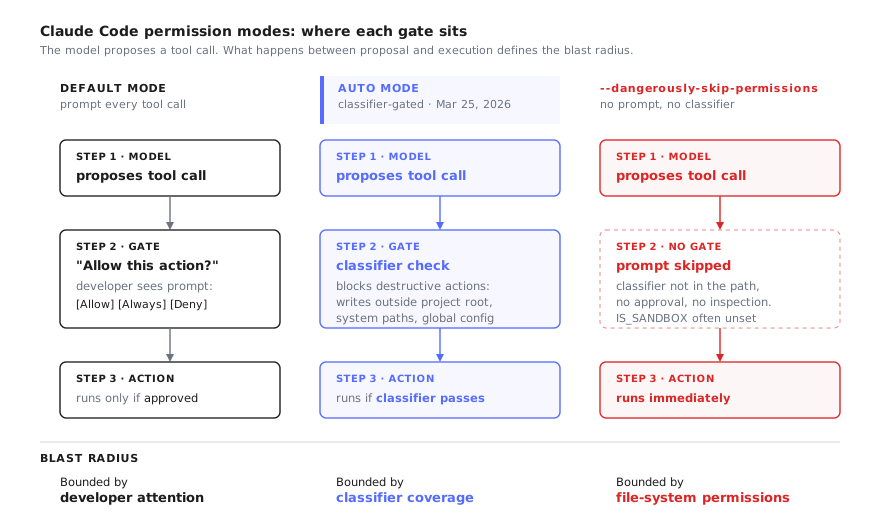
Auto mode is the migration target, but the flag is still in the CLI and still bypasses the classifier — detection has to cover all three paths.
Why your existing security stack probably misses it#
The reflex on Friday afternoon is to ask the obvious question: "doesn't Snyk catch this?" The honest answer is no, and the reasons matter because they tell you where to look instead.
Snyk and Semgrep scan code at rest. They look at source files, lockfiles, and CI configuration. If claude --dangerously-skip-permissions is hardcoded into a Makefile, a package.json script, or a .devcontainer/post-create.sh, Semgrep can catch it with a custom rule (pattern: claude $...ARGS --dangerously-skip-permissions). Snyk Code can be coaxed into the same via custom rules. Neither ships that rule by default.
Wiz, Orca, and the rest of the CSPM category look at cloud infrastructure. They see the EC2 instances, the IAM policies, the S3 buckets. They do not see a developer's MacBook. The Claude Code session is running locally and the only network egress is the Anthropic API call, which looks identical whether the flag is set or not.
CrowdStrike, SentinelOne, and the EDR category are the closest thing to a useful signal source here. They have visibility into process arguments. A custom detection rule that fires on the substring --dangerously-skip-permissions in a process command line will trigger every time the flag is invoked. The work is in writing that rule and routing it to a queue where it actually gets read. No major EDR ships it pre-built today. Lasso Security has published open-source defender research on workstation-agent telemetry that documents the same gap, framing it as a discovery problem rather than a detection problem.
The audit log you actually want, the one that says "developer ran this command, agent wrote these files, here's the diff", is not in any centralized system. It is on the developer's machine, in ~/.claude/projects/<project>/sessions/*.jsonl. MintMCP's audit logging gap research puts it precisely: Anthropic's provider-side logs report token counts per request and model version per request, not "who ran what tool". The evidence you need for SOC 2 is the evidence sitting on the endpoint.
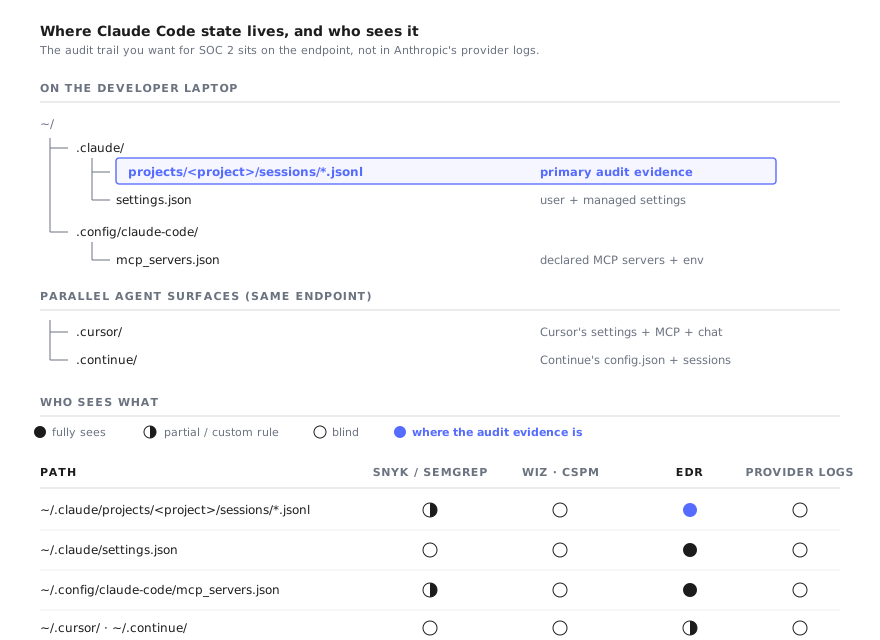
The audit trail you actually want lives on the endpoint, not in Anthropic's provider logs.
The 5-minute triage runbook#
This is what you actually do in the next five minutes.
Step 1. Confirm the scope#
Where did you see the flag? The answer changes the response.
- In a PR, hardcoded in a setup script or a
Makefiletarget. This is the loudest scope. Anyone who runs the script picks up the behavior. Block the PR. The fix is to remove the flag and use auto mode instead. - In a developer's shell config (
~/.bashrc,~/.zshrc,~/.config/fish/config.fishas an alias likealias claude="claude --dangerously-skip-permissions"). Scope is one developer's machine, but every invocation. This is the case where you most need the next four steps. - In a CI/CD job (a GitHub Actions step, a GitLab pipeline, a Buildkite step). Scope is every CI run, multiplied by parallel matrix jobs. The blast radius here is whatever filesystem the runner has access to, which on a shared self-hosted runner can be larger than a laptop.
- In a single one-off command the developer ran in a terminal. Lowest scope, but you still need the session log to know what happened during it.
Step 2. Check for IS_SANDBOX#
A community pattern (popularized by @levelsio's setup and echoed across the YouTube and Reddit discourse) wraps the flag in a sandbox guard:
IS_SANDBOX=1 claude --dangerously-skip-permissionsThe convention is that IS_SANDBOX=1 means the developer has put the agent in a container, a VM, or a chroot, and the flag is safe-by-construction. The absence of IS_SANDBOX next to the flag is the signal. Grep the PR diff, the shell config, and the CI YAML for both strings together.
rg -n --no-heading 'dangerously-skip-permissions' .
rg -n --no-heading 'IS_SANDBOX' .
If the flag appears without IS_SANDBOX in the same invocation context, treat it as unattended-write intent.
Step 3. Pull the Claude Code session transcripts#
Every Claude Code session writes a JSONL transcript. On macOS and Linux the default path is ~/.claude/projects/<project-hash>/sessions/<session-id>.jsonl. Each line is a JSON object representing one model turn or one tool call, with timestamps.
ls -la ~/.claude/projects/
ls -la ~/.claude/projects/*/sessions/ | sort -k 6,7
The most recent JSONL is the session you care about. To get a fast inventory of what ran during that session:
SESSION=~/.claude/projects/<project-hash>/sessions/<id>.jsonl
jq -r 'select(.type=="tool_use") | [.tool_name, .input.command // .input.file_path // "-"] | @tsv' "$SESSION"
That gives you a flat list of every tool the agent invoked and the primary argument (the bash command, the file path, the URL). Read it. If the agent wrote outside the project root, modified ~/.ssh, made network calls, or ran sudo, you have your incident.
For very long sessions, filter by tool name first:
jq -r 'select(.tool_name=="Bash") | .input.command' "$SESSION"
jq -r 'select(.tool_name=="Edit" or .tool_name=="Write") | .input.file_path' "$SESSION"
Step 4. Walk the git reflog#
Anything the agent committed under the developer's identity is now in git history. Anything the agent changed but did not commit is in the working tree or the reflog.
cd <repo>
git log --since="24 hours ago" --author="$(git config user.email)" --stat
git reflog --since="24 hours ago"
git fsck --lost-found
Cross-reference the times in the reflog against the timestamps in the JSONL. If there is a commit you do not recognize, or a reflog entry pointing to a dangling object, the agent did something you have not yet inventoried.
Step 5. Check the MCP server registry#
Claude Code can be extended at runtime by adding MCP servers. The configuration lives at ~/.config/claude-code/mcp_servers.json (or the per-project .mcp.json). An unattended session can register a new MCP server, which then becomes a persistent extension that runs on every subsequent session.
cat ~/.config/claude-code/mcp_servers.json 2>/dev/null
cat <repo>/.mcp.json 2>/dev/null
find ~ -name 'mcp_servers.json' -o -name '.mcp.json' 2>/dev/null
For each server listed, the command field tells you what binary runs and the env field tells you what environment variables it has access to. A server that points at an unknown binary on disk is the highest-priority finding here. We covered this attack surface in detail in our writeup on MCP tool poisoning to RCE.
Step 6. Decide on rollback#
If steps 3 through 5 surface anything destructive, you have three rollback options in increasing order of cost:
git reset --hard <commit>to undo committed changes. Cheap if the agent's commits are isolated.git restore --staged --worktree .plus reflog references to recover lost work the agent overwrote. Medium cost.- Restore from the developer's Time Machine /
restic/ IT-managed backup. The expensive option. Use only if the JSONL shows writes outside the repo root.
If steps 3 through 5 come back clean, you still want to disable the flag going forward. That is the 30-minute work below.
The 30-minute incident assessment#
If the answer to step 1 was "this has been running for a while" (it was in .zshrc for weeks, or it has been in CI since the last sprint), the five-minute runbook is not enough. You need an assessment.
Pull the JSONL session corpus#
# Inventory every session on the developer's machine
find ~/.claude/projects -name '*.jsonl' -newer /tmp/cutoff_date | xargs ls -la
Where /tmp/cutoff_date is a sentinel file you created with touch -d "2026-04-01" /tmp/cutoff_date to bound the time window.
For each session, the questions you are answering are:
- Did the model write to any path outside the project root? Specifically
~/.aws/,~/.ssh/,~/.gnupg/,~/.config/gh/,~/.netrc,~/.npmrc, anywhere a credential lives. - Did the model run a network call to a domain that is not Anthropic, GitHub, or your sanctioned package registries?
- Did the model invoke
curl,wget, orncdirectly with attacker-controlled URLs? - Did the model write or modify a binary in
/usr/local/bin/,~/.local/bin/,/opt/, or anywhere on the developer's PATH?
A single jq query covers the high-value cases:
for f in ~/.claude/projects/*/sessions/*.jsonl; do
  jq -r --arg f "$f" 'select(.tool_name=="Bash" and (.input.command | test("curl|wget|nc |scp |rsync|aws |gh auth"))) | [$f, .input.command] | @tsv' "$f"
done
Map against Anthropic's provider audit logs#
Anthropic exposes audit logs at the API-key and organization level. The fields they include: timestamp, model, input tokens, output tokens, request ID. The fields they do not include: the actual prompt, the tool calls the model made, the file paths it touched, the commands it ran.
The provider audit log answers "was this API key used at this time" and "how much did it cost". It does not answer "what did the agent do". The JSONL files are the answer to the second question.
For SOC 2 or ISO 42001 evidence collection, the artifacts to preserve are: (1) the ~/.claude/projects/ directory in full from the developer's machine, (2) the git history of every repo the developer touched in the window, (3) the Anthropic provider audit log for the same window, (4) endpoint telemetry showing process command-line args if your EDR captured it.
Decide on disclosure#
If the assessment surfaces actual data exfiltration (credentials sent to an unknown domain, source code committed to a repo the developer does not own), escalate to the IR lead and run the standard breach disclosure playbook. If it surfaces destructive writes (agent deleted files, modified configs, broke a dev environment) but no data left the machine, this is a near-miss for the postmortem queue, not the IR queue.
What to ship next sprint#
The triage above is the patch. The fix is at the organization level, and it is three things.
1. Disable the flag in managed settings#
Anthropic supports an enterprise-managed settings file that takes precedence over the user's own ~/.claude/settings.json. Set:
{
  "permissions": {
    "disableBypassPermissionsMode": "disable"
  }
}
per the managed settings reference. When set, Claude Code refuses to start with the flag. This is the policy boundary you want for everyone the org provisions Claude Code for. ksred's writeup on Claude Code YOLO mode walks through the deployment of this setting alongside container-based sandboxing as the recommended posture.
Two caveats. First, the setting only applies when Claude Code reads the managed file, which means the binary has to be installed where the file is discoverable. Developers who run npm install -g @anthropic-ai/claude-code from a personal account may pick up a copy that does not. Second, the setting blocks the flag, not the underlying behavior. Auto mode and default mode are still available, and policy still has to cover what those modes can do.
2. Add PreToolUse hooks#
PreToolUse hooks are Claude Code's policy enforcement layer. The hook runs before any tool call and can deny it. This is the right place to encode "never run rm -rf outside the project root" or "never write to ~/.ssh regardless of mode". The hooks apply across default mode, auto mode, and --dangerously-skip-permissions (when the managed setting hasn't been honored), which makes them the most durable control.
A starting hook is in our Claude Code security checklist.
3. Inventory who has Claude Code installed at all#
Managed settings only help developers your org provisions. The policy hole is the long tail of unmanaged installs, and inventory is the prerequisite.
This is the category Repello AI Inventory sits in. The product discovers which workstations have Claude Code, Cursor, Codex CLI, Continue, and the other workstation agents installed, what configuration they are running, and where the gaps in managed-settings coverage are.
4. Migrate the legitimate uses to auto mode#
For developers who were using the flag for real reasons (long-running refactors, repetitive scaffolding, container-isolated work), auto mode is the migration target. The classifier is good enough for the 80 percent case, and the remaining 20 percent (the destructive actions it blocks) was the part you wanted approval on anyway.
A note on auto mode#
Auto mode is the best alternative Anthropic ships today. It is not a panacea, and it does not retire the SOC's job.
The classifier is best-effort. Anthropic's own framing is that auto mode is "safer than --dangerously-skip-permissions for most workflows", not "safe in the way a container is safe". A novel destructive command pattern the classifier has not seen will pass.
Developers still find workarounds. The flag exists in the CLI and any developer who wants the YOLO behavior can still get it, with or without your managed setting, depending on which binary they are running.
Audit evidence is still on the developer's machine. Auto mode does not change where the JSONL transcripts live, what Anthropic's provider logs include, or what your EDR sees in process args. The evidence-collection workflow is identical under auto mode and under the flag.
The pragmatic posture is layered: auto mode for the developer-experience win, managed settings to disable the flag, PreToolUse hooks for the destructive-action backstop, endpoint inventory for the unmanaged-install long tail, JSONL collection for the audit trail.
How Repello fits#
Repello helps security teams discover, audit, and lock down workstation agents like Claude Code, Cursor, and Codex CLI across an engineering org. The product covers the parts of the runbook above that do not scale by hand: discovering every endpoint that has an agent installed (managed or not), surfacing the configuration state, watching for the flag and other policy-violating invocations across the fleet, and producing the audit artifacts your compliance team wants without anyone tarring up ~/.claude/projects/ by hand.
And if you are tempted to point that same agent at your own application to security-test it, that is a different job than it looks: what a coding agent cannot do as a red teamer covers why an orchestrator without a harness misses the attacks that matter.
If you walked through this runbook today and want to see what it looks like applied across 200 engineers at once, book a demo.
FAQ#
What does --dangerously-skip-permissions actually do?
It tells Claude Code to skip the per-action approval prompt for tool calls. Every file write, every bash command, every MCP tool invocation runs without the developer pressing "Allow". Anthropic ships it as an explicit opt-out from the default permission model and positions it as a "Safe YOLO" mode for sandboxed environments. On a bare developer laptop with no container, it is the difference between a typo and a destructive command running unattended.
Does Anthropic's auto mode replace --dangerously-skip-permissions?
Auto mode (launched March 25, 2026) is the recommended safer alternative. It uses a classifier to block destructive actions while still removing most approval prompts. It does not replace the flag entirely. The flag is still present in the CLI, still works, and still bypasses the classifier. For an SOC, auto mode reduces the blast radius but does not remove the need for detection on the flag itself.
Can Snyk, Wiz, or my EDR detect --dangerously-skip-permissions on a developer laptop?
Not by default. Snyk and Semgrep scan code repositories, not running processes. Wiz and CSPM tools look at cloud infrastructure, not endpoints. EDR can see the process arguments if you write a custom detection rule that watches for the flag string in command-line telemetry, but no major EDR ships that rule pre-built. The audit trail you actually need lives on the developer's machine, under ~/.claude/projects/.
How do I block --dangerously-skip-permissions across my engineering org?
Use Anthropic's managed settings. Set permissions.disableBypassPermissionsMode to disable in the enterprise managed settings file. That refuses the flag at startup. Pair with PreToolUse hooks for shell command policy enforcement so even auto mode and default mode get a second layer of inspection. Detection is still required because developers can install Claude Code outside managed channels.
Where does Claude Code store evidence of what already ran?
Session transcripts land in ~/.claude/projects/<project>/sessions/*.jsonl with one JSON object per turn including tool calls, bash commands, and file edits. Configuration sits in ~/.config/claude-code/. MCP server definitions are in ~/.config/claude-code/mcp_servers.json. Anthropic's provider audit logs report token counts and model versions, not who-ran-what-tool. For SOC 2 evidence you collect the JSONL files, not the API logs.
What's the fastest way to know if a developer already used the flag and did damage?
Three places. First, git reflog and git log --since=24.hours on every repo the developer touched today. Second, the JSONL session files under ~/.claude/projects/ which contain a complete tool-call transcript. Third, the IS_SANDBOX environment variable at the time of invocation. If IS_SANDBOX was unset and the flag was passed, treat it as an unattended-write window and walk the file system changes from there.