Key facts
- Workstation agent security is the discipline of securing AI agents that run as local processes on developer or knowledge-worker machines — Claude Code, OpenClaw, Hermes, Cursor, Windsurf, Replit Agent, GitHub Copilot CLI, Devin — with the user's full filesystem, network, and credential privileges.
- 88% of organizations report confirmed or suspected AI agent security incidents in the past year (Gravitee, 919 orgs). In healthcare, 92.7%.
- Only 14.4% of AI agent deployments go live with full security or IT approval; only 47.1% are actively monitored.
- OpenClaw alone accumulated 137 security advisories in 60 days (Feb–Apr 2026), including CVE-2026-32922 at CVSS 9.9. Claude Code shipped CVE-2025-52882, CVE-2025-59536, CVE-2026-21852, CVE-2026-33068, plus the unpatched TrustFall class. Cursor shipped 11+ CVEs in the same window (CVE-2026-26268 at CVSS 9.9).
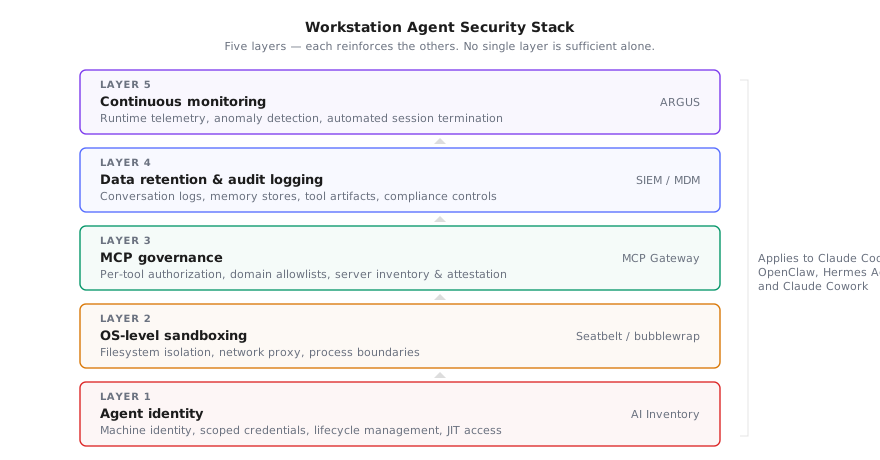
- The defense stack has five layers: agent identity, OS-level sandboxing, MCP governance, data retention and audit logging, continuous runtime monitoring. Browser-DLP and CASB tools do not see workstation agents — they run as the endpoint.
TL;DR: Workstation agents run locally with user-level privileges, inherit credentials, and reach internal networks — yet 88% of organizations already report AI agent security incidents. The five-layer stack that actually secures them: agent identity, OS-level sandboxing, MCP governance, data retention policies, and continuous runtime monitoring.
The workstation agent sprawl problem#
Shadow AI used to mean employees pasting data into ChatGPT. That was a browser-level problem — interceptable by CASB proxies and DLP rules on HTTP traffic. Workstation agents are a fundamentally different threat surface.
Claude Code, OpenClaw, and Hermes Agent run as local processes on developer machines. They inherit the user's full privilege set: SSH keys, cloud credentials in ~/.aws, source code, internal API access, and filesystem write permissions. A Gravitee survey of 919 organizations found that only 14.4% of AI agent deployments go live with full security or IT approval.
The adoption numbers make this urgent. Nearly 70% of enterprises already run AI agents in production, with another 23% planning 2026 deployments. Two-thirds build them in-house. Meanwhile, only 47.1% of deployed agents are actively monitored — meaning more than half operate without security oversight or logging.
This is not a future problem. OpenClaw alone accumulated 137 security advisories in 60 days (February to April 2026), including CVE-2026-32922 at CVSS 9.9. Hermes Agent's architecture ships with a persistent memory store and a skill marketplace that traditional EDR never inspects. The attack surface is here, growing faster than governance can follow.
The security model that worked for SaaS AI — intercept at the network edge, scan the prompt in transit, block the response if it leaks PII — breaks completely when the agent is local. There is no network edge. The agent is the endpoint. Securing it requires a different stack: one that operates at the OS, identity, protocol, and runtime layers simultaneously.
Layer 1: Agent identity — every agent is a non-human identity#
The most common mistake is treating a workstation agent as an extension of the developer running it. The developer's SSO session, API keys, and cloud credentials get silently inherited by an agent that may be executing untrusted code from a third-party skill or MCP server.
OWASP's Agentic Top 10 classifies this as ASI03 — Identity and Privilege Abuse. The risk: cached SSH keys in agent memory, cross-agent delegation without scoping, and confused-deputy scenarios where an agent uses legitimate tools for illegitimate purposes because it was manipulated via prompt injection.
The Gravitee report puts the gap in numbers: only 21.9% of organizations treat agents as independent, identity-bearing entities. The rest rely on shared API keys (45.6%) or hardcoded authorization logic (27.2%).
What the stack looks like:
- Assign each agent instance a distinct machine identity (service principal, short-lived OAuth token, or workload identity certificate). Do not reuse the developer's personal credentials.
- Scope credentials to the minimum resources that agent needs. A coding agent needs repository access; it does not need production database credentials or cloud IAM admin rights.
- Enforce credential rotation on session boundaries. When an agent session ends, the token expires. Long-lived API keys sitting in
~/.config/agent/credentials.jsonare the number one exfiltration target in supply chain attacks against agent ecosystems. - Register agent identities in your IAM system so they appear in access reviews alongside human accounts. If an agent identity never appears in a quarterly access review, nobody is checking whether its permissions are still appropriate.
- Implement just-in-time access. The agent requests elevated permissions for a specific task, receives them for a bounded duration, and the grant auto-revokes when the task completes.
Repello's AI Inventory maps which agents are active across your fleet, what credentials they hold, and which MCP servers they connect to — the first step before you can enforce any identity policy.
Layer 2: Sandboxing — OS-level isolation is non-negotiable#
Permissions prompts are not sandboxing. An agent that asks "may I run rm -rf /?" and waits for approval is not sandboxed — it's politely dangerous. Real sandboxing restricts what the agent can do at the OS level, regardless of what it requests. And when a developer turns the prompt layer off entirely — claude --dangerously-skip-permissions is the canonical case — the SOC is left walking transcripts after the fact; our 5-minute triage runbook covers what to do in the next five minutes when that flag shows up in a PR or on a developer's laptop.
Claude Code implements this correctly. Anthropic's engineering team uses macOS Seatbelt and Linux bubblewrap to enforce filesystem and network boundaries at the kernel level. Filesystem isolation restricts reads and writes to the working directory. Network isolation routes all traffic through a Unix domain socket proxy that enforces domain-level allowlists. The result: an 84% reduction in permission prompts without sacrificing security.
OpenClaw's Docker mode provides container-level isolation, but it's optional — most developers run the default native mode for speed. Our deployment checklist walks through hardening that default. Hermes Agent, as of v0.8.0, has no built-in sandboxing — the CVE-2026-7396 path traversal in its WeChat adapter exploits exactly this gap.
Minimum viable sandboxing for any workstation agent:
| Control | Claude Code | OpenClaw | Hermes Agent |
|---|---|---|---|
| Filesystem isolation | Seatbelt/bubblewrap (native) | Docker mode (opt-in) | None (manual containerization) |
| Network allowlist | Proxy-based domain control | --allowed-hosts flag | None |
| Process isolation | Subprocess inherits sandbox | Container boundary | User-space only |
| Skill/tool execution | Sandboxed subprocess | In-container | Unrestricted |
If your agent doesn't sandbox by default, wrap it. A systemd service with ProtectHome=read-only, PrivateTmp=true, and RestrictNamespaces=true gets you 80% of the way on Linux. On macOS, a custom Seatbelt profile achieves the equivalent.
Layer 3: MCP governance — control what agents can reach#
The Model Context Protocol is the connective tissue between agents and enterprise resources. An MCP server can expose database queries, file operations, API calls, or arbitrary code execution as callable tools. Without governance, every MCP connection is an unscoped privilege grant.
The CIS MCP Companion Guide (April 2026) applies CIS Controls v8.1 to this surface. The core principle: each capability is granted individually, never through broad access. Every invocation is logged. Discovery of new tools requires explicit authorization, not silent auto-registration.
In practice, this means three controls:
1. Per-tool authorization. An agent connecting to an MCP server should not automatically inherit access to every tool that server exposes. Gate each tool behind an explicit permission check — the equivalent of scope: read:database vs scope: *.
2. Domain-level network controls. Claude Code's proxy-based model is the reference architecture: all outbound traffic routes through a domain allowlist. Unknown domains require explicit approval before the connection opens. This catches tool poisoning attacks that embed exfiltration URLs in tool descriptions.
3. Server inventory and attestation. You need to know which MCP servers are installed, who installed them, and what version is running. A rogue or outdated MCP server is equivalent to an unpatched dependency in your supply chain. MCP's structural risks compound when the server itself is compromised.
For enterprise deployments, Repello's MCP Gateway sits between agents and MCP servers, enforcing per-tool authorization policies, logging every invocation, and blocking connections to unattested servers.
Layer 4: Data retention and audit logging#
Workstation agents generate three categories of data that security teams must govern:
Conversation logs. Every prompt, tool call, and response. This includes sensitive data the developer discusses — API keys pasted into prompts, customer PII shared for debugging, proprietary algorithms described in natural language.
Persistent memory. Agents like Hermes maintain cross-session memory stores that accumulate context over time. The threat model for persistent memory includes poisoning attacks where a malicious skill writes instructions into the memory store that execute in a future session.
Tool execution artifacts. File diffs, shell command outputs, API responses. These are often the most sensitive — they contain the actual data the agent accessed, not just the conversation about accessing it.
The governance requirements:
- Define retention periods per data category. Conversation logs may need 90-day retention for compliance; persistent memory stores may need shorter windows to limit blast radius.
- Route audit logs to your SIEM. Claude Code's managed-settings.json supports configuring log destinations at the MDM level — non-overridable by the user.
- Encrypt at rest. Agent memory stores are typically plaintext JSON on disk. Mandate filesystem-level encryption (FileVault, LUKS) at minimum; application-level encryption for the memory store if the agent supports it.
- Purge on offboarding. When a developer leaves, their agent's accumulated memory, credentials, and cached context must be wiped as part of the standard offboarding checklist.
- Classify agent-generated content. Treat code suggestions, refactoring outputs, and tool call results the same way you treat developer-authored code — they flow into your repositories and production systems. If the agent ingested proprietary data to produce that output, the output inherits the classification of the input.
For regulated industries (finance, healthcare, legal), audit logging isn't optional — it's a compliance control. SOC 2, HIPAA, and SOX all require demonstrating who accessed what data and when. An unlogged agent session that touched patient records or financial data is a finding your auditor will flag.
Layer 5: Continuous monitoring and incident response#
Static controls deployed at provisioning time degrade. New MCP servers get installed. Sandbox configurations get relaxed for convenience. Skills from the marketplace introduce new behaviors. A workstation agent security program requires runtime telemetry, not just initial hardening.
What to monitor:
- Anomalous tool invocations. An agent that suddenly calls a database MCP server it has never used before, or calls a known server at 3 AM outside the developer's working hours.
- Credential access patterns. An agent reading
~/.ssh/id_rsaor~/.aws/credentialswhen it has never done so previously. - Network egress to new domains. Any outbound connection to a domain not in the agent's established baseline — especially if the destination appeared in a tool description rather than developer input.
- Memory store mutations. Writes to persistent memory that originate from tool responses rather than direct developer conversation.
The 82% of executives who feel confident in their existing policies are not wrong that policies exist — they're wrong that policies alone enforce themselves without runtime visibility.
Building an incident response playbook for agent compromise:
An agent compromise is not the same as a compromised laptop. The agent may have been manipulated (via prompt injection or memory poisoning) without any malware present on the endpoint. Your IR playbook needs agent-specific steps:
- Isolate the agent session — terminate the process and revoke its identity credentials immediately. Do not just disconnect the network; the agent may have already cached exfiltrated data locally.
- Preserve the memory store — if the agent maintains persistent memory, snapshot it before wiping. The memory contents reveal what instructions the agent was following and which tool calls it made.
- Audit the MCP connection log — identify every tool invocation in the compromised session. Determine whether any tool calls were anomalous and which external resources were contacted.
- Rotate affected credentials — any credential the agent could have accessed during the compromised session must be rotated, not just the agent's own token.
- Scan peer agents — if the compromised agent communicated with other agents (25.5% of deployed agents can create and task other agents, per the Gravitee report), check those sessions for secondary compromise.
Repello's ARGUS provides runtime monitoring for AI agent behavior, flagging anomalous tool use, credential access, and data exfiltration patterns before they complete. When paired with ARTEMIS for periodic red-team exercises against your agent fleet, you get both preventive testing and detective monitoring — the two halves of a complete security program.
Putting the stack together#
The five layers are not independent — they reinforce each other:
| Layer | Prevents | Detects | Responds |
|---|---|---|---|
| Identity | Lateral movement, privilege inheritance | Credential reuse across agents | Revoke per-agent tokens on compromise |
| Sandboxing | File/network access beyond scope | Sandbox escape attempts | Kill agent process on violation |
| MCP governance | Unscoped tool access, supply chain poisoning | Unauthorized server connections | Block and quarantine rogue MCP servers |
| Data retention | Long-term data accumulation risk | Memory store poisoning | Purge contaminated memory, rotate secrets |
| Monitoring | — | All of the above at runtime | Automated session termination, alert escalation |
No single layer is sufficient. An agent with perfect identity scoping but no sandbox can still be manipulated via prompt injection into exfiltrating data through a tool it legitimately has access to. An agent with perfect sandboxing but no monitoring will be exploited silently for months before anyone notices.
Start where your risk is highest. If your developers are running OpenClaw without containerization, Layer 2 is on fire right now. If everyone is on Claude Code with sandboxing enabled but you have no idea which MCP servers are connected, Layer 3 is your priority.
Three free Repello tools cover the audit work each layer needs:
- Agent Wiz (OSS, 375⭐) — Python CLI that extracts agentic workflows from LangGraph, CrewAI, AutoGen, and OpenAI Agents SDK projects and runs STRIDE-style threat modeling against them. Use this to find the layer-by-layer gaps in your specific agent stack.
- SkillCheck — browser-based skill marketplace scanner. Upload a Claude Code or OpenClaw skill
.zipand get a verdict (Safe / High / Critical) with detected prompt injection, data exfil, and supply-chain patterns. Use this on Layer 2 before installing any third-party skill. - Whistleblower (OSS, 153⭐) — offensive security tool that infers an AI agent's system prompt from its outputs. Use this on Layer 5 to test what your own deployed agents leak under adversarial probing, and on Layer 3 to fingerprint third-party agents in your stack.
FAQ#
What is a workstation agent?#
A workstation agent is an AI-powered tool that runs locally on a developer or employee machine with user-level (or higher) privileges. Examples include Claude Code, OpenClaw, and Hermes Agent. Unlike cloud-only SaaS AI, these agents can read local files, execute shell commands, and access internal network resources directly from the endpoint.
Why are workstation agents harder to secure than cloud AI tools?#
Workstation agents inherit the full privilege set of the user running them. They can read SSH keys, access source code, invoke internal APIs, and modify local files without going through a cloud gateway. Traditional DLP and CASB tools that intercept browser traffic have no visibility into a locally executing agent process.
How many enterprises have experienced AI agent security incidents?#
According to the Gravitee State of AI Agent Security 2026 report surveying 919 organizations, 88% reported confirmed or suspected AI agent security incidents in the past year. In healthcare, that figure rises to 92.7%.
What is the CIS MCP Companion Guide?#
The CIS MCP Companion Guide, published April 2026, applies CIS Controls v8.1 to Model Context Protocol environments. It specifies explicit per-tool capability grants, auditable invocations, and least-privilege authorization policies for AI agents accessing enterprise resources via MCP.
Should AI agents have their own identity in IAM systems?#
Yes. The Gravitee report found that only 21.9% of teams treat AI agents as independent, identity-bearing entities. OWASP's Agentic Top 10 (ASI03) identifies identity and privilege abuse as a top risk, recommending that every agent receive scoped, time-limited credentials rather than inheriting a developer's full access.
How does Claude Code implement sandboxing?#
Claude Code uses OS-level primitives: macOS Seatbelt and Linux bubblewrap. Filesystem isolation restricts read/write to the current working directory. Network isolation routes all traffic through a Unix domain socket proxy that enforces domain-level allowlists. Anthropic reports this reduces permission prompts by 84% while maintaining security.
See your own fleet#
Everything in this post describes a surface most security teams cannot currently observe. Workstation Lens is how we close that: every Claude, Cursor, Codex CLI and Copilot agent your developers run, the skills and MCP servers attached to each, and fleet-wide blocking when one deviates. Fifteen-minute setup through your existing EDR.