TL;DR: There is no admin console for MCP. Servers are declared in per-user JSON files on individual laptops, one set per client, and adding one is a text edit that requires no approval and generates no log. The configuration file is the only authoritative record of what an employee connected, which makes this an endpoint inventory problem rather than an identity or network one.
Ask the question the normal way and there is no answer#
"Which MCP servers do our developers have connected?" is a reasonable question, and every familiar way of answering it fails.
There is no SSO log, because most MCP servers launch locally and never authenticate to anything you control. There is no procurement record, because nothing was purchased. There is no admin console, because the protocol does not define one. There is no network signature, because a stdio server communicates over a pipe between two processes on the same machine.
What exists is a JSON file in a developer's home directory that they edited by hand. That file is the entire source of truth, and it is sitting on a laptop.
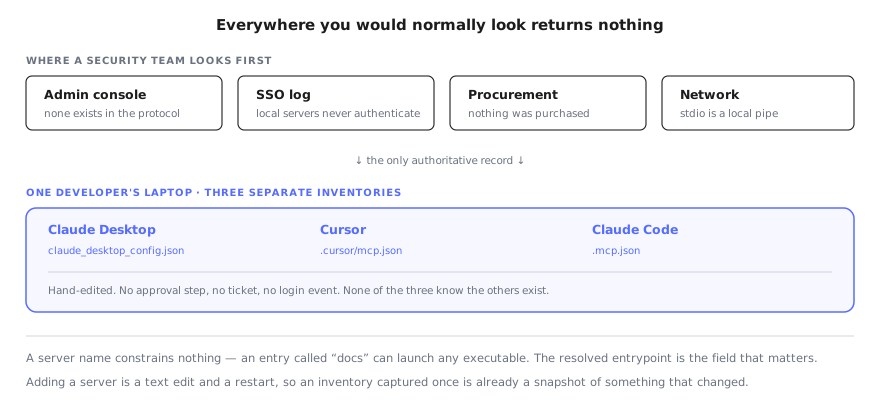
Every familiar place to look returns nothing. The hand-edited config files are the entire record.
Where the configuration actually lives#
Each client keeps its own, which means a developer running three clients has three separate inventories that know nothing about each other.
| Client | Configuration |
|---|---|
| Claude Desktop | claude_desktop_config.json in the user's application-support directory |
| Cursor | .cursor/mcp.json, at user or project level |
| Claude Code | .mcp.json in the project, plus user-level configuration |
| VS Code / Copilot | MCP entries within the editor's settings |
Reading one of these tells you about one client on one machine. The organisational question needs all of them, across every machine, continuously — because the answer changes whenever somebody edits a file.
A server name constrains nothing#
The most common mistake in a first-pass inventory is to collect server names and call it done. The name is a label chosen by whoever wrote the config. It is not validated, not registered, and not connected to what the server does.
An entry called docs can launch any executable with any arguments. This is the same failure we documented in Claude Code as name-keyed trust: the thing a user approves and the thing that actually runs are bound only by a string, and the string is attacker-choosable.
So the field that matters is the resolved command. Specifically:
The entrypoint. A server whose entrypoint is /bin/bash, /bin/sh or python -c hands the connected agent a shell on the laptop. That is not a subtle risk and it is trivially visible in the config — if anyone is reading it.
The package and the version actually running. Most MCP servers launch through npx with a floating tag, which resolves at start time. The code running today is whatever the registry served most recently, not what anyone reviewed. We walked through what that means in practice in the Figma MCP server writeup, where a CVE was fixed in a patch release most users received without ever deciding to.
The credentials. API keys and tokens are routinely passed to MCP servers through environment variables in the same config file. An inventory that records server names but not what was handed to them has missed the part a security team most needs.
The transport. stdio and HTTP have materially different exposure, as the n8n MCP server's three CVEs demonstrated — all three required HTTP multi-tenant mode and none of them reach a local stdio deployment.
Why this is an endpoint problem#
It is tempting to treat this as an identity problem and solve it with tokens and scopes. That helps for the remote, OAuth-backed servers, and it does nothing for the majority, which are local processes launched by a config file.
It is equally tempting to treat it as a network problem. That fails for the same reason local LLM detection fails at the network layer: a stdio server talks to its client over a pipe, and nothing crosses an interface you can watch.
The configuration file is on the endpoint. The process is on the endpoint. The credentials are on the endpoint. Any answer that does not read the endpoint is inferring, and inference is how you end up confidently reporting a number that is wrong.
What a real inventory records#
Per machine, per user, and refreshed rather than captured once:
- Which agent clients are installed and running
- Which MCP servers each client declares
- The resolved entrypoint for every declared server
- The package and the version actually executing, not the one nominally pinned
- Credentials and secrets passed through the environment
- The transport, and for HTTP servers, what they are exposed to
That list is not exotic. It is a handful of files and a process table, which is exactly the data an endpoint agent already collects for other reasons. The gap is that nobody has been asking it these questions.
For the security properties of specific servers once you know what you have, our MCP security guide covers the assessment, and the per-vendor reviews — GitHub among them — work through what individual servers can reach.
FAQ#
How can I get visibility into MCP server connections employees make from their laptops?#
Read the client configuration files, because they are the only authoritative record. MCP servers are declared in per-user JSON on each machine — Claude Desktop, Cursor, VS Code and Claude Code each keep their own — and there is no central registry, admin console or SSO log to query instead. Endpoint tooling that can read those files, resolve what each entry actually launches, and report it centrally is the only approach that produces a real inventory.
Is there an admin console for MCP servers?#
No, and this is the structural problem rather than a gap any single vendor left. MCP was designed for a local client launching a local server on behalf of one user. Nothing in the protocol defines an organisational control plane, an approval workflow, or a way for anyone but the user to see what is connected. Adding a server is a text edit, and it requires no approval from anyone.
Where are MCP server configurations stored?#
In per-client files in the user's home directory. Claude Desktop uses claude_desktop_config.json, Cursor reads .cursor/mcp.json at the user or project level, Claude Code uses .mcp.json alongside user-level configuration, and VS Code keeps MCP entries in its settings. A developer using three clients has three separate inventories, and none of them know about each other.
Why isn't a list of server names enough?#
Because the name is chosen by whoever wrote the config and constrains nothing. An entry labelled "docs" can launch any executable with any arguments. What matters is the resolved command — the binary, the package and version it pulls, and the environment variables and credentials handed to it. A server pointing its entrypoint at a shell gives the connected agent a shell.
What should an MCP inventory actually record?#
Per machine and per user: which clients are installed, which servers each declares, the resolved entrypoint for every server, the package version actually running rather than the one pinned, the credentials passed through environment variables, and the transport. Versions matter because most servers launch through npx with a floating tag, so the code running today is whatever the registry served most recently.
How often does this inventory change?#
Continuously, and without any event you would otherwise see. Installing an MCP server is a text edit followed by a client restart. There is no ticket, no procurement step and no login record. An inventory captured once is a snapshot of a configuration that may already have changed, which is why this has to be a standing measurement rather than an audit.
Read the config files across the fleet#
The inventory exists. It is scattered across per-user JSON on every laptop, and nothing collects it. Workstation Lens reads those files across the fleet, resolves what each server actually launches, flags the entrypoints pointing at a shell, and reports the versions genuinely running.