TL;DR: You cannot detect a local LLM from the network, because it never touches the network. Every shadow-AI playbook built on CASB, DNS logs or SaaS discovery is structurally blind to a model running on the laptop. The signals that work are all on the endpoint: the runtime binary, a process listening on localhost (Ollama on 11434, LM Studio on 1234), gigabytes of weights on disk, and sustained GPU use with no known job. Your EDR already sees all of them.
The detection method and the thing never intersect#
Shadow AI discovery, as it is usually sold, works like this. Watch egress. Resolve destination domains against a catalogue of known AI vendors. Flag the SaaS logins nobody approved. Produce a list of tools in use.
That works well for ChatGPT, Claude, Gemini, and the several hundred wrapper products built on them, because all of them require a round trip to somebody's API. It fails completely for a model running on the laptop.
A developer runs ollama pull once, over what looks like an ordinary software download. After that, every prompt and every completion happens in local memory. No DNS lookup. No TLS session. No SaaS account. No egress to inspect, categorise or block. The network-layer detection stack is not performing badly here; it is looking in a place where the evidence does not exist.
This matters more than it did a year ago because the hardware caught up. A laptop with 32GB of unified memory runs a capable model comfortably, which means the population of employees who could do this is now roughly everyone with a current machine.
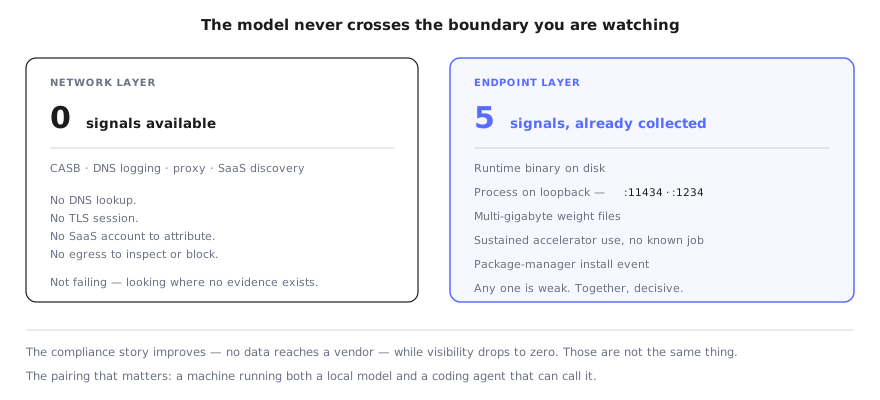
The network stack is not failing here. It is looking at a boundary the model never crosses.
The five signals that do work#
All of these live on the endpoint, and all are observable through tooling most organisations already deploy.
The runtime binary. Ollama, LM Studio, llama.cpp and GPT4All install to predictable locations. Presence of the executable is the single cheapest signal, and it is the one most likely to already be in your software inventory under a name nobody flagged.
A process listening on loopback. Ollama binds 127.0.0.1 on port 11434 by default, configurable through OLLAMA_HOST. LM Studio's local server uses port 1234. Treat the port numbers as a starting point rather than a complete list — the durable pattern is a local process serving an OpenAI-compatible route, since that is what makes the model usable by other software.
Weights on disk. Model files are the least deniable evidence available. A quantised 7B model is several gigabytes; a 70B is tens. Nothing else in a normal developer's home directory looks like a sudden 40GB of .gguf or .safetensors files.
Sustained accelerator use with no known workload. Inference pins the GPU or the unified-memory bandwidth in a distinctive way. On its own this is noisy — so is video editing — but combined with any of the above it stops being ambiguous.
The install event. brew install ollama, a winget entry, a pip install of a serving framework. Package-manager telemetry gives you the moment of introduction and, usefully, the person.
No single one of these is conclusive. The runtime might be an approved research tool; the GPU spike might be a build. Together they are decisive, and the correlation is the whole trick.
Why "the data never left" is the wrong reassurance#
The argument for local models is privacy, and on its own terms the argument is sound. Nothing is sent to a vendor. No third-party retention policy applies. For a team handling regulated data this is a real advantage, and it is why people reach for it.
It also quietly removes every control you had.
When an employee pastes a customer record into a hosted assistant, that is a governance failure with an audit trail. You can find it, measure it, and act on it. When the same record goes into a local model, the event is not logged by anyone — not the vendor, because there is no vendor, and not you, because nothing is watching. The compliance position improves while the visibility goes to zero. Those are not the same thing, and teams routinely trade the second for the first without noticing.
The sharper version of the problem is what the model is connected to. A local endpoint that speaks the OpenAI API is a drop-in backend for a coding agent. Point Claude Code, Cursor or a Codex CLI session at localhost:11434 and the agent reasons through a model nobody approved, with no provider-side logging and no vendor safety layer — while retaining its normal filesystem access, shell access and tool permissions. That is the full capability of an agentic session with none of the audit trail, which is a materially different risk from someone using an unapproved chatbot.
What this is not#
This is not a case for blocking local models. They are genuinely useful, the people running them are usually your strongest engineers, and a prohibition you cannot enforce produces the same invisibility with worse morale.
It is a case for knowing the number. How many machines run a local runtime, and how many of those also run a coding agent? That intersection is small, specific, and where the actual exposure sits. It is also answerable in an afternoon if your endpoint tooling is looking for the right five things.
Our shadow AI detection playbook covers the network and SaaS layers where most discovery effort goes, and our AI asset inventory guide covers what belongs on the list once you have it. This post is the layer underneath both: the machine itself, where the model is running and nothing upstream can see it.
FAQ#
How can I detect shadow AI usage when employees install local LLMs on their laptops?#
Not through the network, because a local model never makes an outbound request. The signals that work all live on the endpoint: the runtime binary on disk, a process listening on localhost, multi-gigabyte weight files, sustained GPU or unified-memory use without a known workload, and the package-manager event that installed it. Any one of these is weak on its own; together they are decisive, and all five are already visible to the EDR agent you run today.
Why does network monitoring miss local LLMs?#
Because there is nothing to monitor. Every shadow-AI detection approach built around CASB, DNS logging, proxy inspection, or SaaS discovery depends on traffic leaving the machine and arriving at a vendor. A model running on the laptop generates no DNS lookup, no TLS session, no SaaS login, and no egress at all. The detection method and the thing being detected never intersect.
What ports do local LLM runtimes listen on?#
Ollama binds 127.0.0.1 on port 11434 by default, and the bind address is configurable through the OLLAMA_HOST environment variable. LM Studio's local server runs on port 1234. llama.cpp's server port varies by how it was launched, so treat port numbers as a useful signal rather than a complete inventory — a process listening on loopback and serving an OpenAI-compatible route is the more durable pattern.
Is a local LLM actually a security problem if no data leaves the machine?#
The data-residency story is true and largely beside the point. A local model is an unlogged, unreviewed inference endpoint sitting on a machine that also holds source code, credentials and customer data, and coding agents on the same laptop can call it. Nothing records what was asked, nothing retains what was answered, and no policy applies to either. The risk is not exfiltration to a vendor; it is a capability your governance has no visibility into.
How do local models interact with coding agents?#
Increasingly directly. An agent configured against a local OpenAI-compatible endpoint routes its reasoning through a model nobody approved, with no provider-side logging and no safety layer the vendor would otherwise apply. The agent still holds its usual filesystem and tool access. You get the full capability of an agentic session with none of the audit trail.
What should security teams do first?#
Inventory before policy. Find out how many machines already run a local runtime and which of those also run a coding agent, because that intersection is where the real exposure sits. Writing an acceptable-use clause against a population you have not measured produces a document rather than a control.
Get the number before you write the policy#
The intersection that matters — machines running a local model and a coding agent — is not visible from the network, and it is visible from the endpoint. Workstation Lens inventories every Claude, Cursor, Codex CLI and Copilot agent your developers run and what each one is pointed at, through the EDR you already deploy.